
ZC-F006 RFQs: Separate the Oil Icon States
What should a buyer request about the ZC-F006 oil icon?
Ask the supplier to document the oil icon separately for the scheduled cleaning reminder and the overload or fault context described for the ZC-F006. Request a labelled display reference for each condition and the instructions that apply to the offered version. Link those references to the sample and quotation so support staff can tell which explanation belongs with each display state.
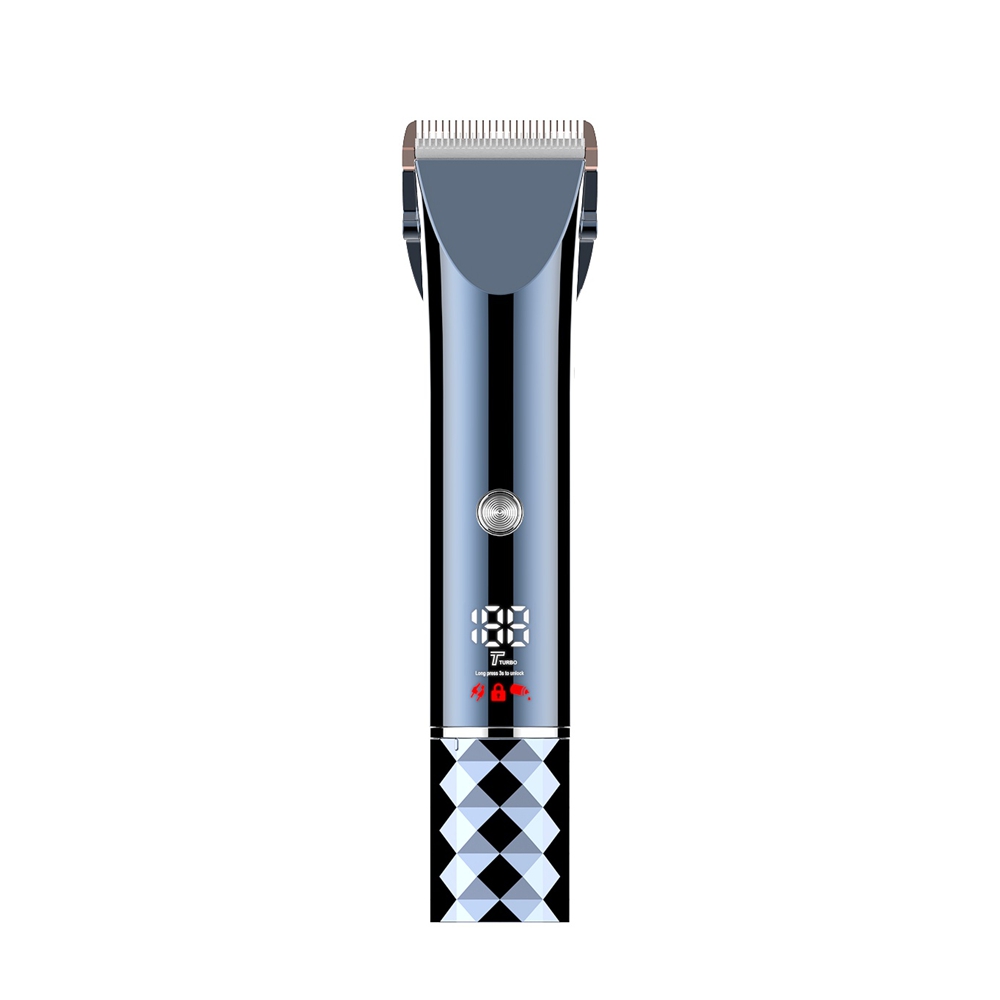
The ZC-F006 Electric Hair Clippers listing describes an oil-drop indicator in both contexts. The catalogue front image shows several markings together. It helps identify the display area, while the supplier’s separate reference for each context is needed to establish how the offered version presents them.
Use the front view to identify the display area. Request a separate labelled reference for each oil-icon context.
Ask for one explanation per context
Give the supplier two rows to answer. In one, ask for its description of the scheduled cleaning reminder for the offered clipper. In the other, ask which display indication its instructions identify when they describe overload or a fault. Request the name used in the instructions and the accompanying view for each row.
Where the supplier uses the same drawing for both rows, ask what other visible cue or documented context tells them apart. If the supplier confirms there is no visual difference in the icon itself, keep that answer beside the two separate explanations. Leave either row open until the supplier says which documentation applies to the exact unit quoted.
The oblique view locates the display on the body. Ask the supplier which view represents each actual state.
Request the evidence without interpreting a catalogue illustration
Ask the supplier for a labelled screenshot, photograph or relevant instruction diagram for each context. Have it identify the exact symbol and any other display elements it expects the buyer to use. Request a sample identifier or a document reference next to the image, so a distributor can tell whether the picture belongs to the reviewed clipper.
If the supplier provides a picture of every symbol on the display, ask whether it is a layout overview or evidence for one of the two contexts. Keep an overview as an orientation aid. Ask the supplier for separate context evidence where needed. A static image showing the icon next to other symbols leaves the condition behind the image unresolved.
Buying field
Requested supplier response
Offered version
Identify the ZC-F006 unit, sample and quotation line.
Cleaning reminder
Provide the supplier’s name, labelled display reference and applicable instruction section.
Overload or fault context
Provide a separate display reference and the applicable instruction section.
How to tell the states apart
State whether the display uses distinct cues and identify them in the supplier record.
Document revision
Name the date or revision and the exact unit version covered.
Buyer review
Record which row has been clarified and which still needs supplier evidence.
Match the references to the support material for the quote
When the supplier returns an instruction page, compare its title, model reference and revision with the sample record. Ask whether the same material will accompany the quoted units. If it is only a technical reference or a different version’s manual, retain that label and request the customer-facing reference applicable to the actual offer.
The ZC-D28-1 travel-lock guide covers another clipper’s separate lock enquiry. Keep its model record separate from the oil icon material. For this purchase, make the two oil-icon contexts independently searchable in the support file so a reader can locate the right supplier instruction without carrying over another model’s explanation.
The rear view supports product identification. Keep the state-specific evidence with the same sample reference.
Keep a change visible after sample approval
If the supplier sends a revised unit or manual, ask it to identify whether either oil-icon explanation has changed. Compare the revised display reference for each row with the prior approval. Retain the old document number and the new number together until the supplier has confirmed which one applies to the quotation.
Send the exact product link and two-row request through the supplier contact page. Include the current sample identifier if there is one. Ask the supplier to respond with its own wording for each state and the supporting view or instruction reference. Leave unresolved distinctions open in the purchase record.
Use separate records for the cleaning reminder and the fault context.
Ask the supplier to mark the relevant display cue for each.
Keep the approved instruction revision with the exact sample and offer.
Buyer FAQ
Does a visible oil icon identify the display condition?
Ask the supplier to identify the condition and show any distinguishing cues for the offered version.
What if the icon looks the same in both views?
Request the supplier’s explanation of how the contexts are distinguished in its instructions and retain it beside both rows.
Can another model’s manual answer the question?
Ask for the instructions that the supplier confirms apply to the ZC-F006 version in the quotation.
What if the quotation changes after approval?
Ask whether either display reference or instruction revision changes, and link the answer to the revised offer.
wholesale hair clipperB2B supplier sample record